Após o vÃrus que peguei na última semana, fiz backup num hd antigo (Maxtor 60 GB) que tinha aqui… é removÃvel, fica em um case e conecto ao notebook pela porta USB.
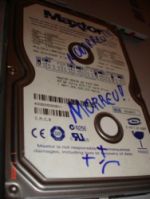 Backup feito nele (todas as minhas coisas pessoais e algumas de trabalho), coisas de trabalho salvas em DVD, formatei o note. Tudo ok, volto instalando o básico e quando ligo o HD removÃvel, nada de reconhecer. Levava minutos para listar a unidade no Explorer e quando aparecia, clicava e dava erro. Tentei em outro note, mesmo problema. Como última alternativa, instalei o HD no computador de uma amiga com o cablo flat, direto na placa mãe. Nada. PÂNICO!
Imagine a cena… suas coisas pessoais, acumuladas em uma década… desespero total né…
Fiz algumas buscas e achei a dica de colocar o HD dentro da geladeira. Segui as instruções e NADA 🙁
Então tive a idéia de buscar por softwares que recuperam dados de mÃdias defeituosas. Mas não acreditava muito que daria certo, pois nem acessar o HD eu conseguia via Explorer. Depois de algumas pesquisas, encontrei a dica para o programa EasyRecovery. Um pouco descrente que funcionaria (pelo motivo descrito cima), instalei e na mesma hora mandei rodar. Gente, eis que ele enxerga meu HD, fica um tempo catalogando todos os arquivos e depois me pergunta quais quero recuperar. Não acreditei.. quase tive um treco. Parecia um sonho. Me parece que foi TUDO recuperado.
Data recovered to C:\Recuperado\.
16601 files recovered.
26.25 GB data recovered.
Copy Time: 1:42:03
Copy finished with no errors.
Um sonho. Recomendo profundamente. == EasyRecovery ==
Maysa
Relembrando: comprei este hd em meados de 2002 e lembro-me de ter dito: “esse vai me servir pro resto da vida“… rsrsrs, já estava aposentado há anos aqui. Peguei só para fazer o backup. Hoje uso 80 GB interno + 120 GB externo, totalizando 200 GB e ainda tenho sérios problemas de espaço 🙂
Boa noite maysa, mas to igual o kideg ai, comprei um hd externo 40g salvei meus dados, desliguei ooo, liguei e confirmei os dados salvos, ai desliguei e exclui os dados do meu pc pra limpar e agora que to precisando dos dados cade, ligo o cabo usb2 e ele fica fazendo um barulho tipo agulha pulado e o pc não exerga, tenho outro hd externo fiz o teste e o pc ta visualizando ele, será que este meu tem recurso vou posso esquecer meus dados deste que não visualiza a entrada? pode me ajudar?
Oi pessoal!
Gostaria de indicar uma pessoa que me ajudou recuperando meu HD e todos os dados que estavam nele:
Tel. 11 7444-6633 ou 3667-3484 falar com Daniel
O site dele é http://www.expertdohd.com
Ele atende no local e tem preço super flexÃvel.
Abraços!
Pow… rodando o Easy Recovery ele nem localiza o HD pifado (um Maxtor 500 Gb SATA II). Alguém tem uma dica?
Gostaria de agradecer esta dica e aproveitar para perguntar sobre meu caso. O meu HDD tb pifou mas só que trabalho na plataforma MAC com OS X e será que teria como usar este recurso ou programa???? Preciso de ajudaaaaa
Parabéns pela dica.
não consegui….: ( ele fica analisando meu hd, escaneando mas não acha nada….alguem pode me dar umas dicas?
Sim, Davi… no meu caso, recuperou perfeitamente, sem renomear arquivo nem nada.
Sucesso!
Maysa
Maysa,
Esse programa recurpera também a hierarquia dos diretórios?
Abraço,
Davi
nosss maysa, exatamente o que aconteceu com o meu de 40GB da samsung, pensei que era só no caso de hds formatados, será que no meu vai funcionar, visto que também tenho um case externo e quando ligo, ele não é reconhecido e fica dando uns estalinhos. vou tentar, valeu pela dica!
Realmente esse programa ajuda e muito na hora do desespero. Aqui na loja onde trabalho uso ele de vez em quando em alguns Hd’s zicados que surgem.
Já salvei até dados importantes de prefeituras, após o tecnico da prefeitura formatar sem fazer backup devidamente.
Ótima dica!