Não sei porque cargas d’água mas as minhas janelinhas popup no Firefox começaram a abrir tudo estranho, deste tamanhinho abaixo. Não conseguia ler nada. DaÃ, abria o Internet Explorer para acessar diversos sites.
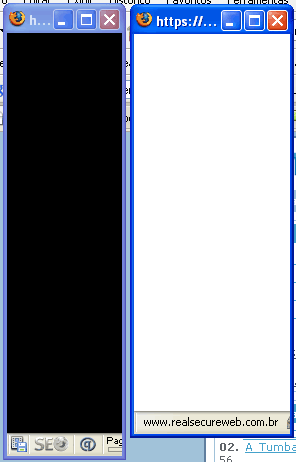
Mas encontrei a solução para meu problema: habilitar o recurso dom.disable_window_open_feature.resizable no Firefox.
1 РNa barra de endere̤os do Firefox, digitar about:config e d̻ enter;
2 – Na tela abrir, procure por dom.disable_window_open_feature.resizable (CRTL + F ajuda) e troque seu valor de false para true.
Já estava perdendo a paciência em usar o FF… agora sim, resolvÃ.
Maysa
Valewwwwww
Era TudO o que eu estava precisandO
valew mesmO
AgradecidO pela dica
UP /
obrigada! eu não fazia a menor idéia do que seria essas janelas pequenas e sem recursos para aumentar.
Isso ñ acontece só com o Firefox no IE tbm!!Parabéns pelo blog é muito bom só assuntos interessantes.Gostei mto
Continue assim
Pingback: Dica para redimensionar qualquer janela popup no Firefox | Veja Isso
Ótima Dica Maysa, estava sofrendo do mesmo problema, mas culpa de umas páginas mal configuradas de amigos meus ehhehe
Replicado será!
A versão 2.0.0.9 está totalmente bizarra. Toda hora tenho problemas com .dll do programa, chega até dar raiva e abro o Opera. 😀